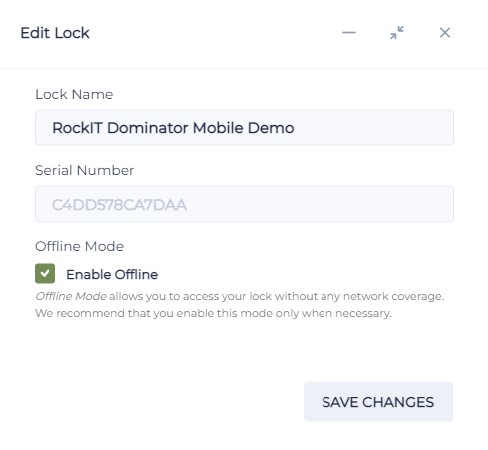
Lock Activation Enable Offline Mode
The RockIT Mobile app both transfers and collects lock and user permission and activity data. It receives updates from the RockIT cloud portal and uploads lock activity actions to the cloud portal. Activity data include the date and time, unlock or lock status, battery use and the location.
When to use the Offline Mode setting on activating a lock
- At a remote lock site if there is no cellular network coverage or intermittent coverage.
What to remember
- Always open your RockIT app while in mobile network coverage to ensure your permissions are current. If they are not you will not be able to open the lock.
- That the RockIT app collects the unlock and lock activity on your phone and only sends to the RockIT cloud portal when you next open your app in mobile coverage.
- If the lock is set to Offline and moved to an Online mobile network coverage site it will both download changes from the RockIT cloud portal and upload lock activity to the cloud portal.
- If the lock is not set to Offline mode and used in a remote location without mobile coverage the mobile app will not be able to open the lock.
Why is opening my RockIT app in coverage important
- On opening the RockIT app it connects to the RockIT cloud portal and retrieves current or changed lock and user permission information. You cannot do this when offline.
- On opening the RockIT app if you have been out of mobile coverage it uploads the unlock and lock events that have occurred and the RockIT cloud portal is updated.
How to ensure I have access to a lock from my RockIT app
- Ensure that your RockIT app is opened in mobile network coverage every seven days to ensure your permission are re activated. This ensures that when you next open a lock your permissions are current. It also prevents someone who’s permissions may have been revoked to no longer gain entry past the 7 day re activation period.
Key Points when locks are in non mobile network coverage sites
- Set the lock to Offline mode.
- When you open the RockIT app is downloads and uploads data to the RockIT cloud portal.
- Remember to open your RockIT app before going into an offline site. This ensures your permissions are current with any new locks changes, otherwise you may not get access to new or changes locks sites.